Your API Can Work Perfectly and Still Deliver a Bad Developer Experience
What building, testing, documenting, and troubleshooting a small API taught me about Developer Experience.
An API can return the correct response.
The tests can pass.
The server can be running.
And the developer can still have a terrible experience.
That was the surprising part of building my latest project.
I started with a simple goal: build a small Express API.
But instead of stopping when the API worked, I decided to approach it from a different perspective:
What happens if I pretend I have never seen this project before?
I followed my own README.
I ran the commands.
I copied the examples.
I tried valid requests.
I tried invalid requests.
I looked at the errors.
And I tested whether the documentation actually matched reality.
That changed the project completely.
It stopped being just an API project.
It became a Developer Experience experiment.
The API Wasn't the Real Problem
The API itself was intentionally small.
It exposes:
GET  /hello
POST /hello
A successful request to GET /hello returns:
{
  "message": "Hello, Developer!"
}
The POST endpoint accepts:
{
  "name": "Virginia"
}
and returns:
{
  "message": "Hello, Virginia!"
}
If the developer sends an invalid request, the API responds with:
{
  "error": "Name is required"
}
Nothing complicated.
And that's exactly why it was useful.
With a small API, it becomes much easier to notice the friction around the API itself.
Then I Tried to Use My Own Documentation
This was where things became interesting.
I stopped thinking like the person who built the project.
Instead, I tried to think like someone discovering it for the first time.
The first question was simple:
Can I get from a fresh clone to a working API without guessing?
The answer was initially: not quite.
I found several problems.
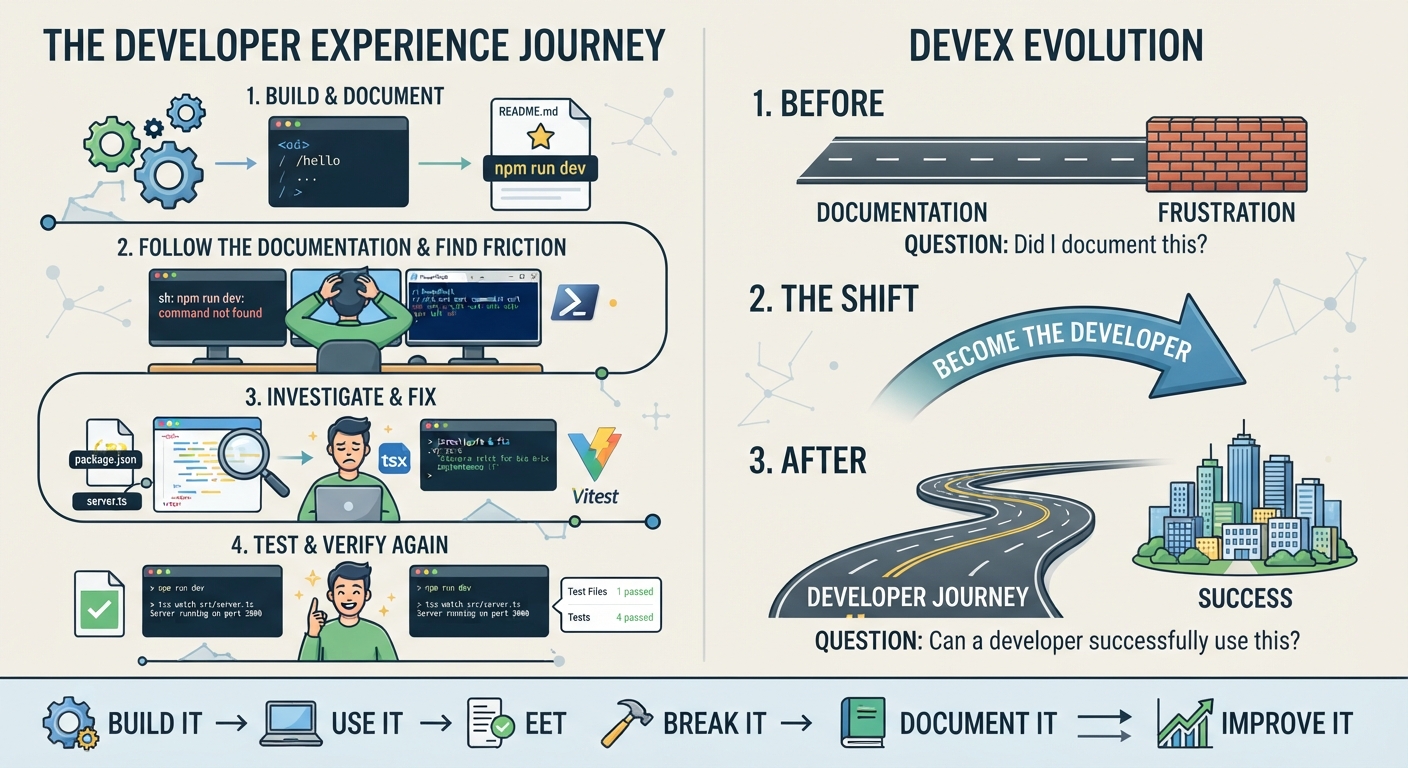
1. The documented development command didn't exist
The README instructed developers to run:
npm run dev
But the project didn't initially have a dev script.
The documentation was telling the truth about what I wanted developers to do.
It just wasn't telling the truth about what the project could actually do.
That distinction matters.
A documentation page can look perfectly reasonable while describing a workflow that fails the moment someone follows it.
I fixed this by adding the development script:
{
  "scripts": {
    "dev": "tsx watch src/server.ts",
    "test": "vitest"
  }
}
Now the documented command and the actual project behavior matched.
2. The API worked, but the example didn't work for my environment
The original API example used Unix-style curl syntax.
I was testing the project in Windows PowerShell.
The API wasn't broken.
The request example was.
That sounds like a small distinction.
For a developer trying to get started, it isn't.
I replaced the example with a PowerShell-friendly request:
Invoke-RestMethod -Uri "http://localhost:3000/hello" -Method Post -ContentType "application/json" -Body '{"name":"Virginia"}'
This taught me something I hadn't fully appreciated before:
Documentation is experienced through an environment.
A technically correct command is not automatically a useful command.
The shell matters.
The operating system matters.
The developer's context matters.
3. The failure path mattered just as much as the happy path
It is easy to document the successful request:
{
  "name": "Virginia"
}
But what happens when the developer doesn't send name?
Or sends the wrong type?
For example:
{}
The API responds:
{
  "error": "Name is required"
}
That response is part of the API's developer experience.
It tells the developer:
- something went wrong
- which field caused the problem
- what the API expects
This changed how I think about documentation.
I used to think of documentation as something that sits beside the product.
Now I see it as something that works together with the product.
The API response explains one part.
The documentation explains another.
The troubleshooting guide handles another.
Together, they create the developer journey.
Tests Became Documentation Insurance
Manual testing is useful.
But I didn't want to rely on:
"I tried it once and it worked."
So I added automated API tests with Vitest and Supertest.
The final suite checks four scenarios:
- Successful
GET /hello - Successful
POST /hello - Invalid
name - Missing
name
The result:
Test Files  1 passed
Tests       4 passed
That gave me something important.
The documentation wasn't just describing what I thought the API did.
I had automated checks verifying the behavior.
This led me to a principle I want to carry into future documentation work:
Tests can protect documentation from silently becoming fiction.
If the API changes and the documented behavior is no longer true, something needs to catch that drift.
Then I Added OpenAPI
Once the API behavior was stable, I documented the API using OpenAPI.
The specification describes:
GET /helloPOST /hello- request body requirements
- successful responses
- validation errors
- operation IDs
- the development server
I then validated the specification with Redocly.
The result was more than a Markdown page.
The API had a machine-readable contract.
That matters because API documentation has different audiences.
A developer might want a quick example.
A documentation engineer might want a structured specification.
A tooling system might want machine-readable API information.
An API specification can support all three.
Documentation Became Part of the Development Workflow
At this point, the project had moved beyond:
Build an API.
It had become:
Build an API and make the experience around that API trustworthy.
I added:
- a QuickStart
- API usage examples
- validation documentation
- troubleshooting guidance
- a Developer Experience audit
- automated tests
- OpenAPI documentation
- Redocly validation
- GitHub Actions CI
- a case study documenting the investigation
The documentation itself became part of the engineering workflow.
Changes could be reviewed through pull requests.
The OpenAPI specification could be validated in CI.
The documentation could be compared against actual API behavior.
That is where docs-as-code started becoming much more real to me.
It isn't simply putting Markdown files in Git.
It is treating developer-facing information as something that should be:
written → reviewed → tested → maintained → verified
The Developer Experience Loop
The biggest lesson from this project wasn't a particular tool.
It was a workflow.
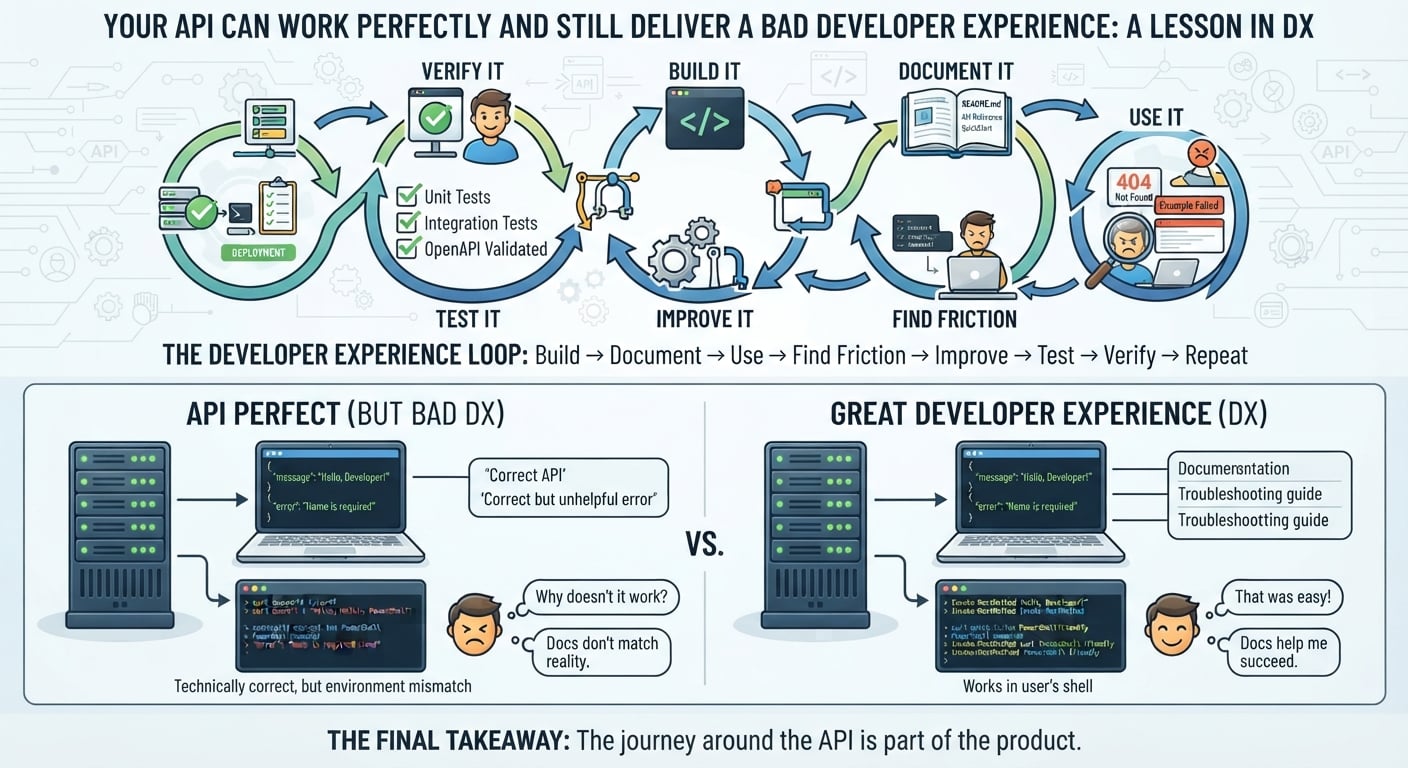
I started thinking about Developer Experience as a continuous loop:
Build
  ↓
Document
  ↓
Use
  ↓
Find friction
  ↓
Improve
  ↓
Test
  ↓
Verify
  ↓
Repeat
This changes the question you ask.
Instead of:
"Did I write the documentation?"
You start asking:
"Can a developer actually make progress with it?"
That's a much harder question.
And a much more useful one.
What I Would Check Now Before Calling Documentation "Done"
For a developer-facing API, I would now ask:
Setup
Can someone clone the project and understand what to do next?
QuickStart
Do the documented commands actually work?
Examples
Can developers copy and run the examples in their environment?
API behavior
Do the examples match the actual API?
Errors
Can developers understand what went wrong?
Troubleshooting
If something fails, is there a clear path forward?
Tests
Is important documented behavior protected by automated tests?
API specification
Does the OpenAPI definition match the implementation?
CI
Can changes be validated automatically?
Verification
Has someone actually followed the documentation from the developer's perspective?
These questions are simple.
But together, they reveal a lot.
The Most Important Shift
The project changed how I think about technical documentation.
I don't want to only ask:
"Is this documentation accurate?"
I want to ask:
"Does this documentation help the developer succeed?"
Those are related questions.
But they aren't the same question.
A page can be technically accurate and still be difficult to use.
A command can be correct but fail in someone's shell.
An API can return the right status code but provide an unhelpful error.
A README can explain everything and still leave a new developer wondering:
"Okay... what do I do now?"
That gap is where Developer Experience lives.
What This Project Proved to Me
This small API gave me a practical way to explore something much bigger.
Developer Experience isn't one feature.
It isn't just documentation.
It isn't just error messages.
It isn't just onboarding.
It is the combination of all the small interactions that determine whether a developer can move forward.
And sometimes the best way to discover those problems is surprisingly simple:
Become the developer.
Clone the project.
Read the README.
Run the command.
Copy the example.
Break the request.
Read the error.
Try again.
Then fix what made the journey harder than it needed to be.
Final Takeaway
I started this project thinking I was building an API.
I ended up learning that I was really building an experience around an API.
The code has to work.
The documentation has to work.
The examples have to work.
The errors have to help.
The tests have to verify.
And the whole journey has to make sense.
That is the standard I want to carry into future work with APIs, SDKs, AI integrations, and developer tools.
Because developers don't experience your codebase directly.
They experience the path you create around it.
And that path is part of the product.
Build it. Use it. Break it. Document it. Improve it. Verify it.